Working in slots
Each repo has a pool of slots: git worktrees at
<pool_root>/<repo>/slot-N (by default next to your repos, in .pools/). A slot
is either free or claimed for a branch. Claiming one is fast because its
dependencies and build caches are still there from last time.
Your checkout
The repo's own checkout is where agents read and plan; slots are where changes happen. velmux keeps it that way:
- It stays current. After each background fetch, the checkout is
fast-forwarded to its upstream (your main branch), never merged or rebased.
If local changes are in the way, or it has commits of its own, it's left as it
is and you're told. When main moves you're also told which slots are now
behind; the repo's right-click menu has sync all slots. Turn it off with
fast_forward = false. - Changes there are flagged. Its row shows
✎2when it has uncommitted changes. Move changes to a slot… (its right-click menu) stashes them, claims a slot on a branch you name, and puts them back there. - Claudes velmux starts can't edit it. They run with two guards, passed
with
--settingsand merged with your own settings: a Claude Code hook that refuses file edits inside the checkout and tells Claude tovelmux claima slot and edit there, and a permission rule denying those edits, which Claude enforces even where hooks are turned off. If your organisation's Claude settings switch both off (allowManagedHooksOnly/disableAllHooksandallowManagedPermissionRulesOnly),velmux doctorsays so; agents are still asked to work in slots, and✎still flags changes. Turn the guards off withguard = false. (A Claude you start yourself gets the same advice from the skill, but no guards.)
Claiming and releasing
Claim a slot for a branch: an existing local or remote branch is checked out, a new one is created from the base ref (your main branch).
- Claude does it itself:
velmux claim feat/short-name(with the skill installed, or from the system prompt Claudes started in the repo get). Inside velmux its pane moves under the slot. - You:
<prefix> n,⌘⇧N, or the repo's right-click menu. - Anywhere:
cd "$(velmux claim feat/login)".
The least recently used free slot is taken, fetched, switched to the branch, and
its dependencies installed if the lockfile changed. Configured post_claim
hooks run, and gitignored files like .env are linked from your checkout.
Release hands it back: velmux release (Claude, or you in the slot),
<prefix> r, or the slot's right-click menu. Uncommitted work is stashed, the
slot is reset to the base ref, and everything that isn't dependencies or caches
is cleaned away. A Claude that claimed the slot moves back to your checkout,
still in the same conversation.
Parked work
Releasing a branch that still has work on it (uncommitted changes, or commits not on the base) parks it. Parked branches show under their repo:
◌ feat/promo-banner 2 files · 3hClick one to resume it: a free slot is claimed on that branch, the stashed
changes come back, and so does the Claude that was working on it: the
conversation itself if it's still open, else resumed from its transcript.
Claiming the branch by name does the same. Discard drops its stashed changes
(the branch and its commits are kept). From the command line: velmux parked,
velmux discard <branch>.
Commits made on a detached slot are kept on a velmux/rescue/* branch and parked
like any other.
Slot health
Slot rows show:
↓3 | the base has 3 commits the slot doesn't |
! | a rebase or merge stopped on conflicts |
⋯ | still being set up (the step shows in the status line) |
Repos are fetched in the background (every 15 minutes by default) so ↓ stays
current.
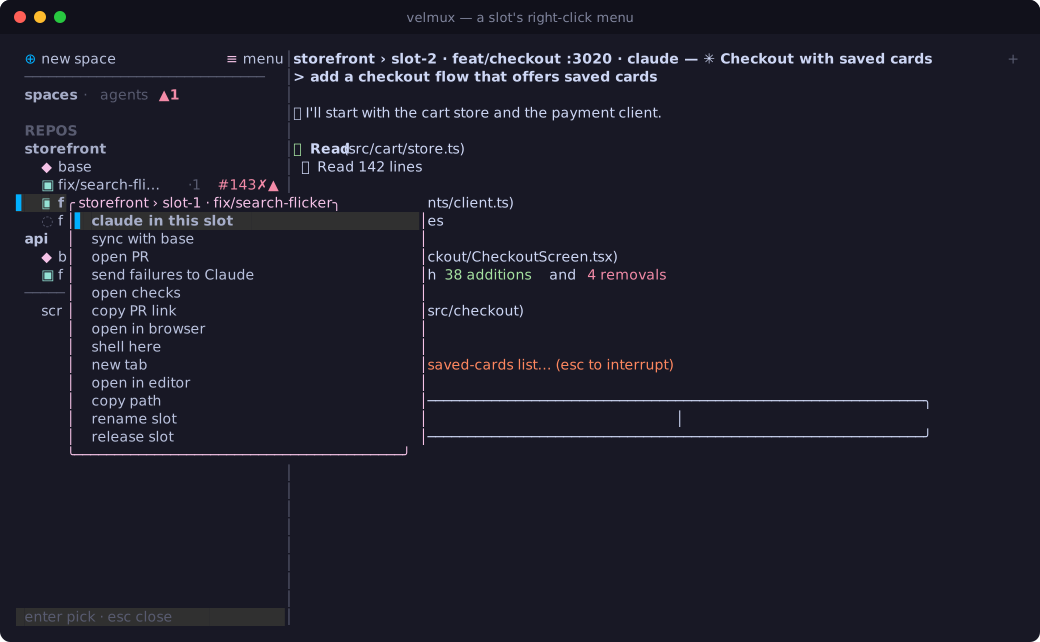
Sync with base (the slot's right-click menu, <prefix> u, velmux sync)
fetches and rebases the branch onto the base ref, with uncommitted work set aside
and put back. If there are conflicts it backs out, leaves the slot exactly as it
was, and tells you which files: resolve them yourself, or ask the slot's Claude.
Set sync = "merge" to merge instead.
Ports
Each slot gets its own ports, so dev servers in different slots don't collide.
By default slot N gets PORT = 3000 + 10·N (slot-2: 3020), in every pane and
post_claim hook in that slot. Your checkout is left alone. The port shows in
the header (slot-2 :3020) and velmux status, and the slot's right-click menu
opens http://localhost:<port>.
Add variables or move the block with [ports], e.g.
RCT_METRO_PORT for Expo. Outside velmux, eval "$(velmux env)" in a slot (or
velmux env >> .envrc for direnv) sets the same variables.
Pull requests
With the GitHub CLI (gh) installed and signed in, velmux checks the PRs of
your claimed and parked branches about once a minute:
#142✓ | checks passing |
#142✗ | checks failing |
#142… | checks running |
#142⇡ | merged |
You get a notification when a PR merges or its checks start failing. The slot's
right-click menu has push & open PR (pushes the branch and opens GitHub's
new-PR page; <prefix> P), then open PR, open checks, copy PR link,
and when checks fail, send failures to Claude: it asks the slot's Claude to
read gh pr checks and gh run view --log-failed and fix them.
Once the PR has merged, release moves to the top of the menu, and the branch isn't parked (there's nothing left to resume, unless it had uncommitted changes).