Using velmux
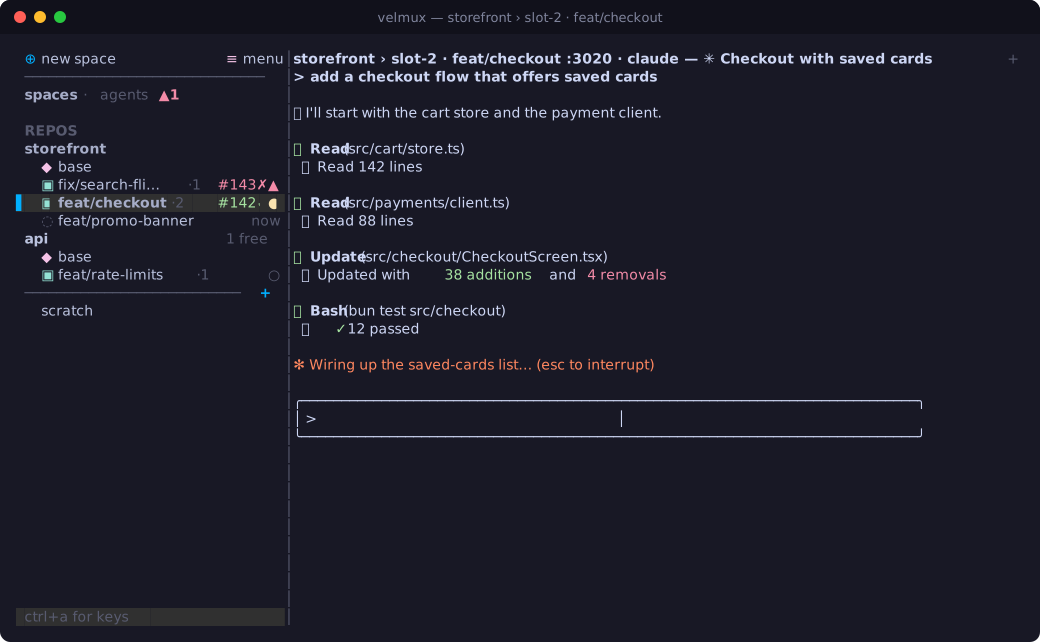
A background server owns every pane, so you can close your terminal or detach
(<prefix> d) and come back with velmux: everything keeps running.
The sidebar
From the top:
⊕ new spaceadds a repo: it lists the git repos in yourscratch_dir(default~/Workspace) that aren't in the sidebar yet, or type a path. Also<prefix> N.≡ menu: a short menu of app-wide actions (themes, settings, restart, detach, stop). Also<prefix> m.spaces · agentsswitches views (<prefix> g). The agents view lists every agent with where it is and what it's doing, the ones that need you first; click one to jump to it.
The spaces view lists each repo with its checkout (◆ base) and its
claimed slots (▣, branch first, slot number dimmed; free slots are a count
on the repo's line). Below them, parked branches (◌) waiting to be
resumed. Below a divider are scratch sessions: shells (or anything) outside
any repo; the divider's + (or <prefix> S) starts one in your scratch_dir.
Each row shows its agents' states on the right:
● | working |
▲ | blocked on you (a permission prompt, a question) |
○ | idle |
✓ | finished while you were elsewhere |
Slot rows also show their health and PR: ↓3 behind the base, ! a rebase or
merge stopped on conflicts, ⋯ still being set up, #142✓ its PR and checks
(see Working in slots).
Right-click a row for what you can do there. A repo: start a conversation, claim a slot, a shell, rename, remove. A slot: Claude in it, sync with the base, its PR, open in the browser on its port, a shell, release. A parked branch: resume or discard. A session: Claude or a shell in it, rename, remove.
Drag a repo or a session to reorder; a line shows where it will land. Nothing collapses, so the layout never shifts as you move around.
Tabs and panes
Every place (a repo's checkout, a slot, a session) has its own tabs, and each
tab is a split layout, so a slot can show Claude beside a test-runner shell.
Tabs sit in the header, named after what they run (or what you call them), with
their agents' states, so a background tab still tells you when it's done or
blocked. Click one to switch, + for a new one, scroll over the header to
cycle, ⌃0 (or <prefix> ;) to flip back to the last one.
Panes are labelled by what's running and where (shell · packages/web, bun,
nvim).
Keys
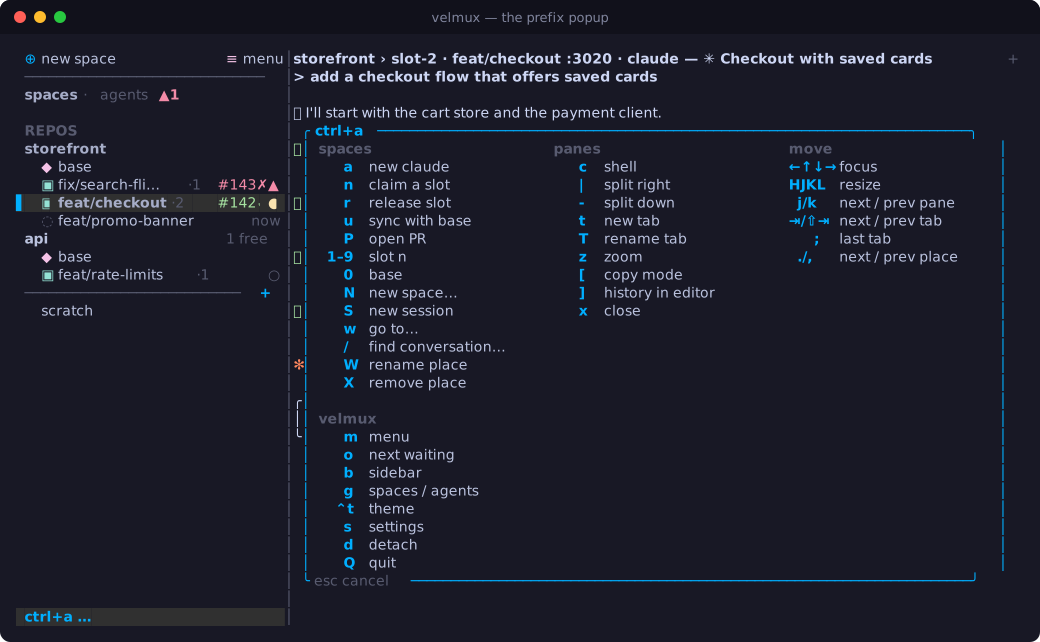
Press the prefix (ctrl+b by default) and a popup lists every key you can
press next:
<prefix> then | |
|---|---|
a | a Claude conversation in the repo |
n / r | claim a slot (asks for a branch) / release it |
u | sync the slot with the base |
P | open the slot's PR (or push and start one) |
N / S | new space / new scratch session |
c / e | shell / editor here (splits the focused pane) |
| / - | split right / down with a shell |
arrows, H J K L | focus a neighbour, resize |
z | zoom the focused pane |
t, tab / shift+tab, ; | new tab, next / previous tab, last tab |
T / W | rename the tab / the place |
w | go to any place (fuzzy-find) |
/ | find a conversation |
1–9, 0 | slot N of this repo, its base |
alt+1–9, , / . | place N, previous / next place |
o | jump to the next agent that needs you |
X | remove this place (or release it, in a slot) |
b | hide / show the sidebar |
[ / ] | copy mode / the pane's whole history in $EDITOR |
j / k, x | cycle panes, close a pane |
s / R | settings (edit the config) / reload it |
ctrl+t / ctrl+l / ctrl+r | theme picker / redraw / restart the server |
d / Q | detach / stop the server |
<prefix> | send the prefix key itself |
Prefix-less shortcuts
Any action can be bound with no prefix. The defaults follow a ⌘-driven layout:
⌘N / ⌘⇧N | new conversation / claim a slot |
⌘P | go to any place |
⌘⇧F | find a conversation |
⌘1–9 | place N, across every repo |
⌥1–9, ⌥0 | slot N of this repo, its base |
⌃1–9, ⌃0 | tab N, last tab |
⌘T, ⌘⇧[ / ] | new tab, previous / next tab |
⌘⌃[ / ] | previous / next place |
⌘D / ⌘⇧D | split right / down |
⌘W, ⌘⇧↵ | close the pane, zoom |
⌘⌥ arrows | focus a neighbour |
⌘B, ⌘⇧U | sidebar, next agent that needs you |
⌘R / ⌘⇧R | rename the tab / the place |
⌘, | settings |
⌘⇧W, ⌘⇧⌫ | release the slot, remove the place |
They use key codes apps never receive, so they can't clash with an app's own
keys, but your terminal has to send them: velmux keys --ghostty prints the
Ghostty config lines, and velmux keys --test shows what your terminal sends.
Rebind anything in the config.
Mouse
Click a pane to focus it, a sidebar row to go there, a tab to switch. Drag a
divider to resize. The wheel scrolls a pane's history (and closes it again at
the bottom), sends arrow keys to full-screen apps like less, and passes
straight through to apps that ask for the mouse (vim with mouse=a, full-screen
TUIs). Hold Shift (Option in iTerm2) for your terminal's own selection.
Copying
Drag over text in any pane to copy it, even in apps that use the mouse; a click that doesn't move still reaches the app. Double-click copies a word, triple-click a line. Copies go to the clipboard and to your terminal (OSC 52), so they work over SSH too.
Copy mode (<prefix> [) freezes the focused pane and opens its history.
vi keys move (hjkl, ^u ^d ^b ^f, g G, 0 $), v / V select by character
or line, y or Enter copies and exits, / and ? search (smartcase), n N
repeat, q or Esc exits.
<prefix> ] opens the pane's whole history as plain text in $VISUAL /
$EDITOR, in a new tab.
Finding a conversation
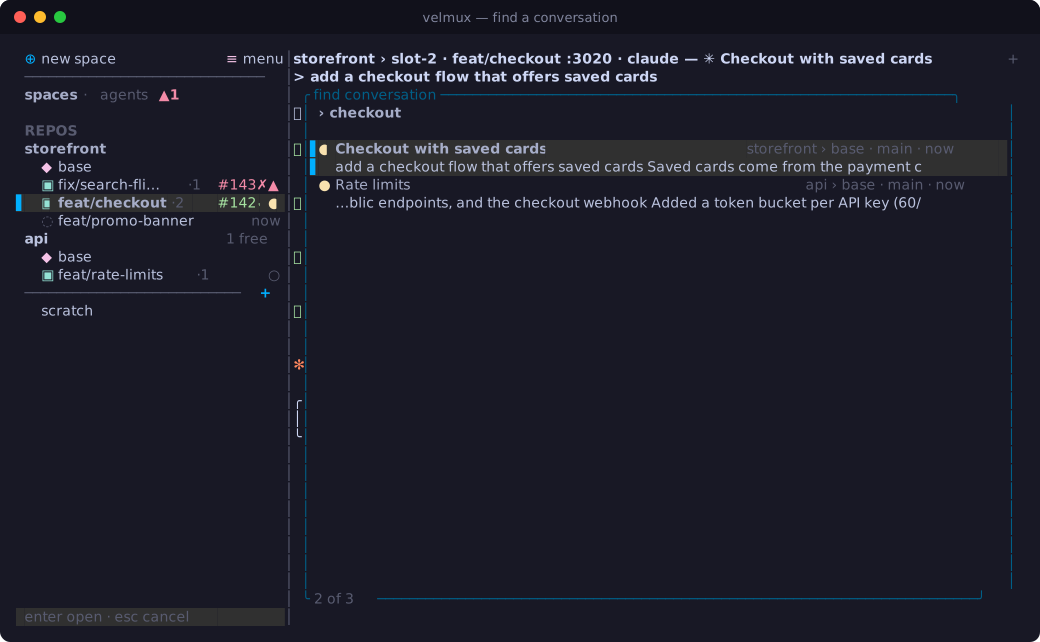
⌘⇧F (or <prefix> /) searches every Claude conversation in your repos, their
slots and your sessions: titles, your prompts and Claude's replies. Every word
has to match; title matches come first, then the newest. Each hit shows where it
ran, its branch, how long ago, and ● if it's open right now. Enter goes to
it, or resumes it: in its slot if that's still on its branch, by resuming the
branch if it's parked, else in the repo.
Notifications
When an agent finishes while you're not looking at it, or is blocked on you, velmux shows a desktop notification (through your terminal, or the OS when you're detached) and plays a sound. "Looking" means its pane is focused and your terminal window is in front: a Claude finishing in the pane you left while you read docs in a browser still chimes. Merged PRs and failing checks on your slots notify too.
Pick the sounds with sounds… in the menu: a column for "finished" and one
for "blocked on you", each played as you move to it, Enter to keep. velmux ships
herdr-done / herdr-request (from herdr),
confirm, glass, pluck, question and bong (from
Kenney), and its own chime and knock; see NOTICE.
Turn sounds or notifications off in the config.
Themes
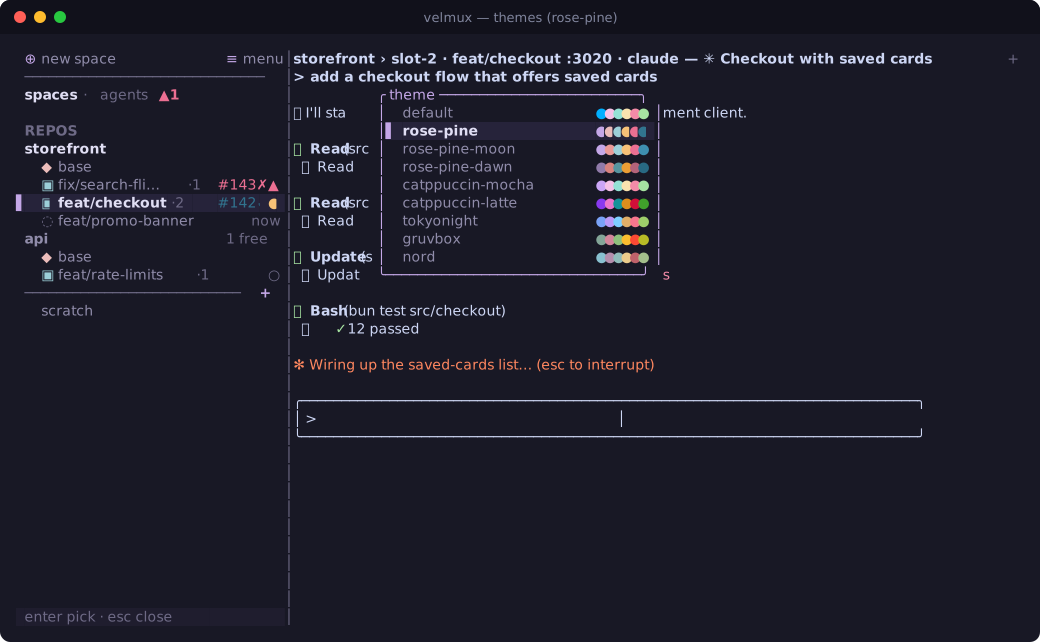
<prefix> ctrl+t (or the menu) previews themes live: arrows to look, Enter to
keep (saved to your config), Esc to go back. Built in: default (your
terminal's palette), rose-pine, rose-pine-moon, rose-pine-dawn,
catppuccin-mocha, catppuccin-latte, tokyonight, gruvbox, nord.
Override any colour in the config.
Restarting and restoring
velmux saves everything as it changes. After a stop (<prefix> Q,
velmux stop), a crash or a reboot, velmux brings it all back: shells and
editors reopen, each Claude resumes its exact conversation in the slot it ran
in, and every pane's scrollback is replayed above it.
velmux restart (or <prefix> ctrl+r) restarts the server in place: panes
keep running, screens and scrollback are kept, and your terminal reconnects by
itself. With auto_restart on (the default) this happens whenever the velmux
binary changes, so upgrading is just installing.
If the screen ever looks wrong, <prefix> ctrl+l redraws it (and nudges every
pane to re-read its size).
Updates
velmux checks velmux.com for a newer version when it starts and twice a day
(a plain request for the latest version: nothing about you or your repos is
sent). When there's one you're told once, and ≡ menu shows ↑. Update
velmux… in the menu (or velmux update) updates it the way you installed it:
Homebrew runs brew upgrade in a new tab; a downloaded binary (the install
script, a release archive) is downloaded, checked against its checksum and
swapped in place, and the running velmux restarts into it. velmux update --check only says whether there's a newer one. Turn checks off with
update_check = false.